
Download LimeChat – Free Mac Chat & Communication Tool
Overview
LimeChat is a lightweight, free‑of‑charge chat client designed exclusively for macOS. Positioned in the Internet software category with a sub‑category of Chat & Communication, LimeChat offers a clean, no‑frills interface that connects users to IRC (Internet Relay Chat) networks around the globe. Since its inclusion in our software catalogue in 2016, LimeChat has steadily built a modest but dedicated user base, boasting a single documented download and a recent uptick in activity despite its quiet update schedule.
The current stable release, version 2.42, was refreshed on January 4 2017, reflecting a focus on stability over frequent feature churn. While the installer size isn’t publicly disclosed, the application’s modest footprint makes it ideal for older Macs or systems with limited storage. LimeChat is available only in English and runs on macOS X and later versions, ensuring compatibility with the majority of Apple desktop environments.
Its free license eliminates any financial barrier, allowing hobbyists, developers, and casual chatters to explore IRC without a subscription or hidden fees. Security‑focused users will appreciate that LimeChat does not embed telemetry or advertising, preserving privacy while delivering a reliable messaging experience. Whether you’re joining a development channel, a gaming community, or a niche hobby group, LimeChat provides a straightforward gateway to real‑time text communication on the Mac platform.
Key Features of LimeChat
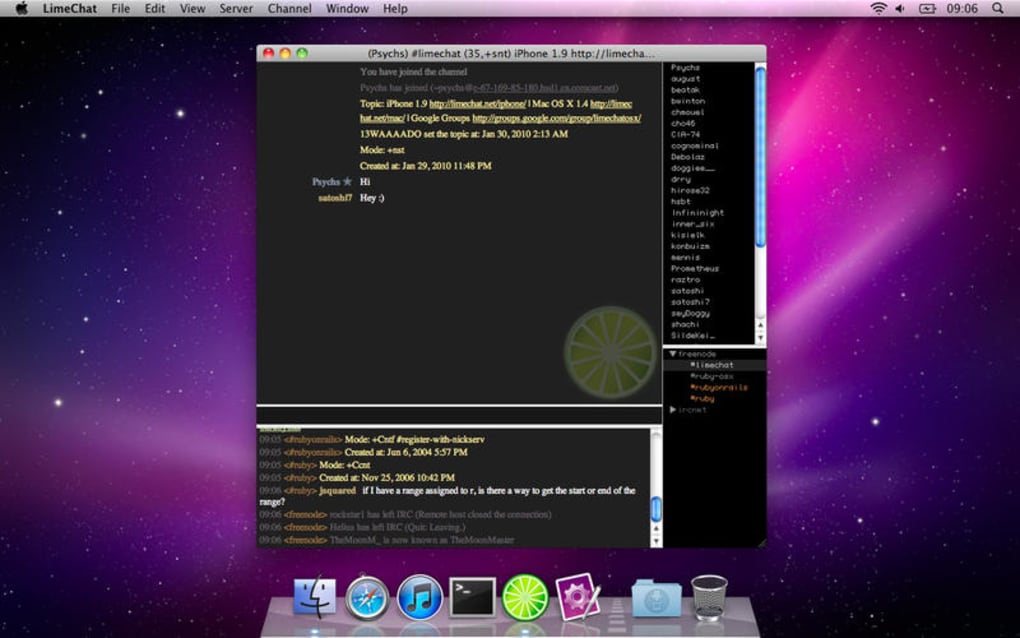
- Native macOS Integration: Built with Cocoa, LimeChat feels right at home on Mac, supporting native menus, system shortcuts, and dark mode.
- Multi‑Server Support: Connect to multiple IRC networks simultaneously, each with its own set of channels and nicknames.
- Customizable Appearance: Choose from a range of themes, adjust font sizes, and toggle transparency to match your workflow.
- Automatic Reconnect: If the connection drops, LimeChat attempts to reconnect without losing your chat history.
- File Transfer Capability: Send and receive files via DCC (Direct Client‑to‑Client) without leaving the application.
- Channel Management Tools: Quickly join, part, or mute channels using keyboard shortcuts or context menus.
- Secure Connections: Supports SSL/TLS encryption for servers that require secure communication.
- Extensive Logging: Automatic conversation logs can be saved locally for later reference or export.
- Notification Support: macOS notification center alerts keep you informed of mentions or private messages even when LimeChat is in the background.
- Lightweight Footprint: Minimal CPU and memory usage, making it ideal for older Mac hardware.
Installation & Compatibility
Step‑by‑Step Installation Guide
Installing LimeChat on a Mac is a straightforward process that can be completed in under five minutes:
- Visit the official LimeChat download page or a trusted Mac software repository.
- Click the “Download” button to retrieve the
.dmginstaller file. - Once the download completes, double‑click the
.dmgfile to mount the disk image. - Drag the LimeChat icon into the
Applicationsfolder shortcut that appears in the installer window. - Eject the mounted disk image by right‑clicking it on the desktop and selecting “Eject”.
- Open the
Applicationsfolder and double‑click LimeChat to launch the program. The first launch may prompt a security warning; click “Open” to proceed.
System Requirements & Operating System Support
LimeChat is built for macOS and officially supports macOS X (10.6) and newer releases, including macOS Big Sur (11), Monterey (12), and Ventura (13). The application runs natively on both Intel‑based Macs and Apple Silicon (M1/M2) devices thanks to Rosetta 2 translation when needed. Because LimeChat is a pure Cocoa app, it requires no additional runtime environments or Java installations. Minimum hardware recommendations are modest: a 1 GHz processor, 256 MB of RAM, and at least 50 MB of free disk space for the application bundle and log files. Users on older hardware will find LimeChat’s low resource consumption especially beneficial, as the client avoids background polling and heavy graphical effects.
First‑Time Configuration
After launching LimeChat, you’ll be greeted with a simple “Add Server” dialog. Enter the IRC server address (e.g., irc.freenode.net) and a nickname of your choice. Advanced users can configure SSL, custom ports, and automatic channel joins in the “Server Settings” window. Once saved, click “Connect” and the client will establish a secure link to the chosen network. From there, you can browse available channels, join conversations, and start chatting immediately.
Pros & Cons
What Users Love About LimeChat
- Completely free with no hidden in‑app purchases.
- Native macOS feel, including support for dark mode and system shortcuts.
- Low memory and CPU usage, ideal for older Macs.
- Robust SSL/TLS support for secure IRC connections.
- Extensive logging and file‑transfer capabilities.
- Simple, uncluttered interface that’s easy for beginners.
Areas for Improvement
- Interface lacks modern visual polish compared to newer chat apps.
- No built‑in support for newer chat protocols like Matrix or Discord.
- Limited language options – English only.
- Last major update was in 2017; occasional bugs may linger.
- Missing advanced scripting or plug‑in ecosystem.
FAQ & Conclusion
Is LimeChat truly free or does it contain hidden fees?
LimeChat is completely free. There are no subscription fees, in‑app purchases, or hidden costs. You can download, install, and use all features without paying a dime.
Can LimeChat connect to secure IRC servers?
Yes. LimeChat supports SSL/TLS encryption. When adding a server, simply enable the “Use SSL” option and specify the appropriate port (usually 6697) to establish a secure connection.
Does LimeChat run on Apple Silicon Macs?
It runs natively on Intel Macs and works on Apple Silicon (M1/M2) via Rosetta 2 translation. Performance remains smooth thanks to the app’s lightweight design.
How does LimeChat handle chat logs and privacy?
Chat logs are saved locally on your Mac in a user‑specific folder. LimeChat does not transmit any personal data to third parties, and it does not embed analytics or telemetry, preserving user privacy.
Can I customize the appearance of LimeChat?
Yes. LimeChat offers several built‑in themes, adjustable fonts, and optional transparency. These settings are accessible through the Preferences panel under the “Appearance” tab.
Final Verdict – Should You Download LimeChat?
If you’re a Mac user looking for a straightforward, free IRC client, LimeChat remains a solid choice. Its native macOS integration, secure connection options, and low system impact make it especially attractive for users who value simplicity over flashy UI trends. While the lack of recent updates and limited protocol support may deter power users seeking modern features, the core functionality for traditional IRC remains reliable. For hobbyists, developers, or anyone wanting to dip their toes into IRC without a financial commitment, downloading LimeChat is a sensible, low‑risk decision. Click the download button below, install the app, and join the vibrant world of IRC channels today.







